
Analysis Outputs
Output files can be created by users of LiSA at any point during the analysis: all
that is needed is to create an output stream to a file and write to it. However,
LiSA adopts a more schematic approach. By relying purely on LiSA’s APIs, all
components that have a FileManager reference can create output files. Such
components are Checks and EventListeners, both through the ReportingTool
reference that their callbacks accept as parameter.
This page contains class diagrams. Interfaces are represented with yellow rectangles, abstract classes with blue rectangles, and concrete classes with green rectangles. After type names, type parameters are reported, but their bounds are omitted for clarity. Only public members are listed in each type: the
+ symbol marks instance members, the * symbol marks
static members, and a ! in front of the name denotes a member with a default
implementation. Method-specific type parameters are written before the method
name, wrapped in <>. When a class or interface has already been introduced in
an earlier diagram, its inner members are omitted.
The FileManager class
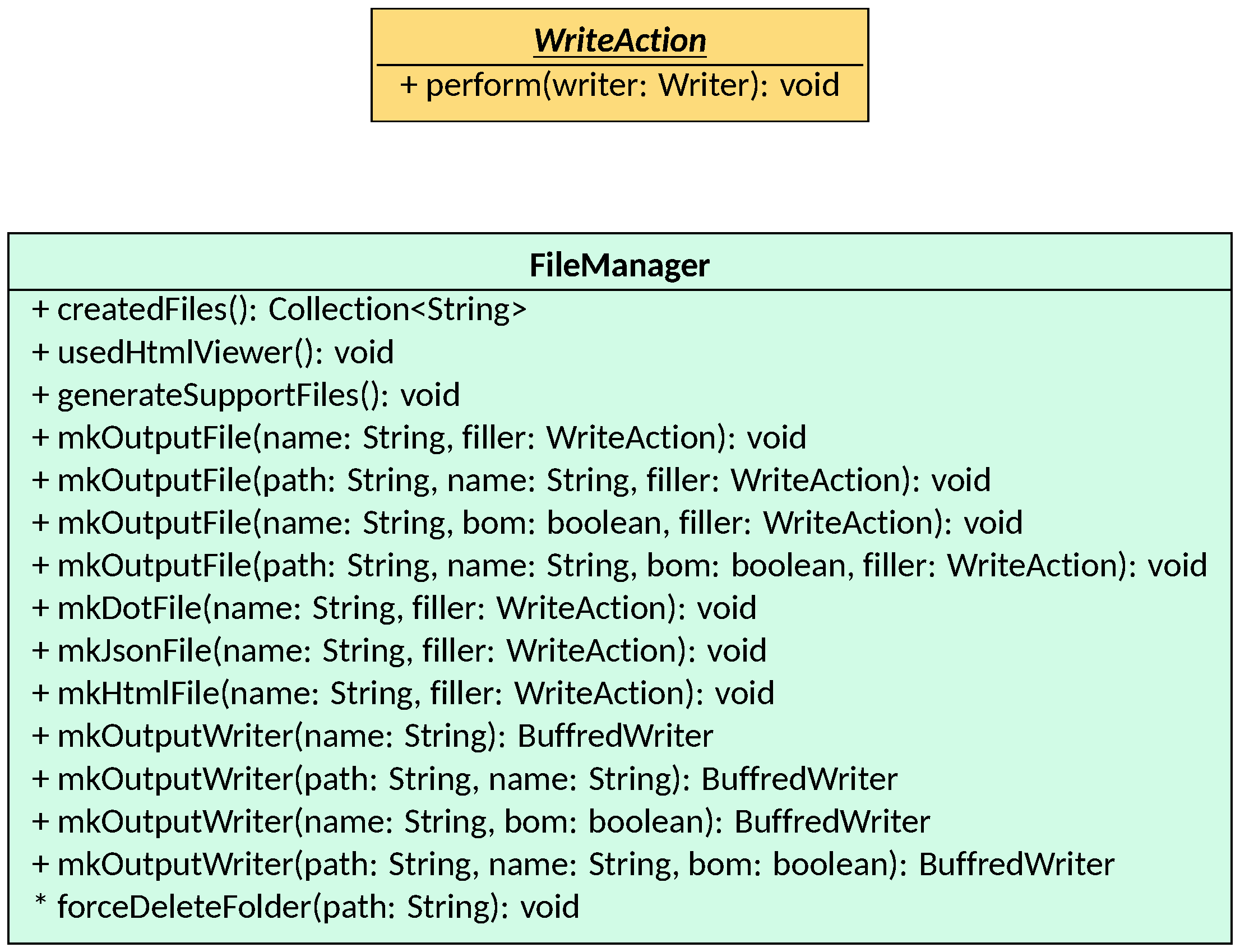
The FileManager class is the main API for file management in LiSA. It
provides utilities for creating output files by providing a filler action (i.e.,
a function that consumes a Writer instance to write to the output file) or for
creating BufferedWriter instances pointing to specific files. In both cases,
file creation happens by creating a file with the given name that is created
inside the working directory of the analysis, as identified by the
configuration passed to LiSA. More information about the working directory and
how it can be set can be found in the Configuration page.
Optionally, a path can be specified to create the file in a subdirectory of the working
directory.
A FileManager instance is accessible from the ReportingTool passed to both
Checks and EventListeners: thus, both these components can also create output
files during their execution.
The LiSAReport class
The entry points of the analysis, i.e., the LiSA.run overloads, return a
LiSAReport instance. This class contains summaries of everything that has been
computed and generated during the analysis:
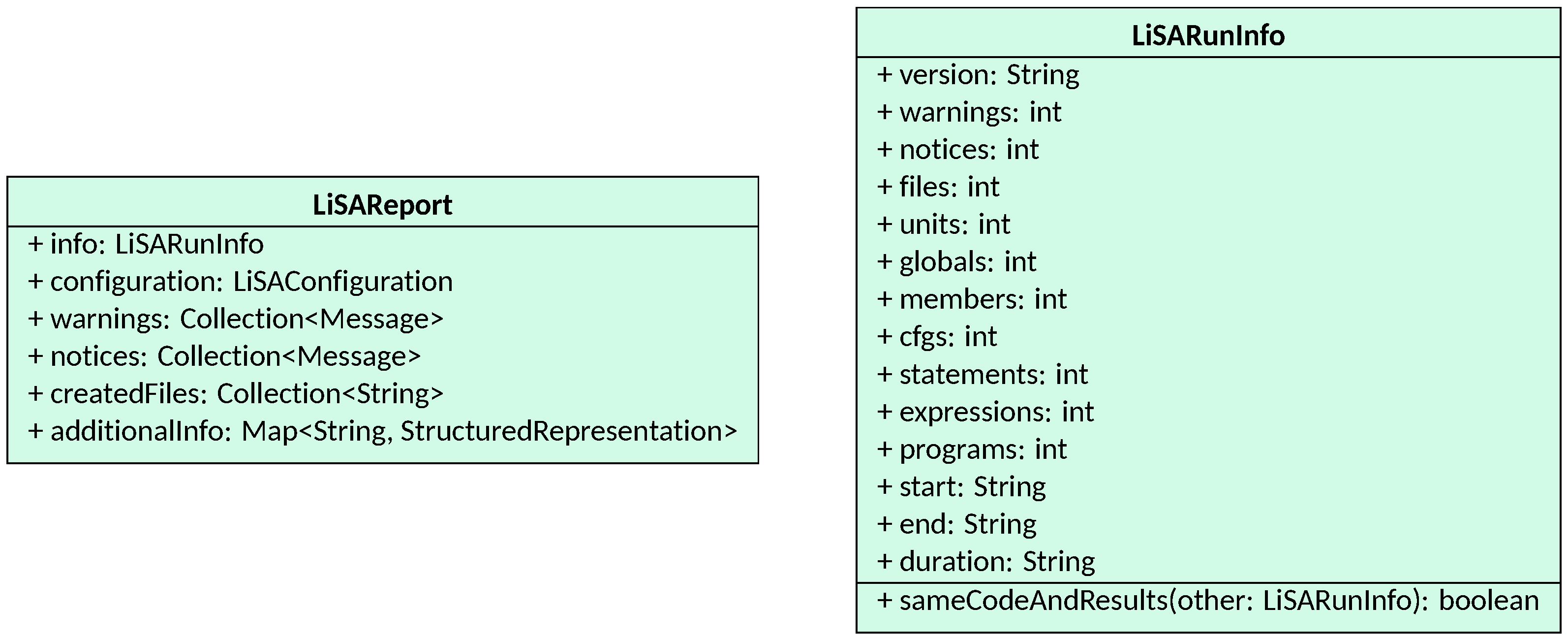
Specifically, it contains a LiSARunInfo instance that reports useful metrics
on the program that has been analyzed (mainly on its size in terms of number of
CFGs, instructions, units, etc.) and on the results of the analysis (e.g.,
number of warnings and notices generated, and number of files created). These
metrics are particularly useful when writing tests to monitor any changes in
either the input or the output of the analyses.
Other than the LiSARunInfo instance, a LiSAReport also contains a reference
to the LiSAConfiguration used to run the analysis, the collection of generated
warnings and notices, and the collection of files that have been generated
during the analysis, identified by their path relative to the working directory.
Additionally, the LiSAReport contains a field named additionalInfo. This
field can be used to store any additional analysis-specific information
generated as a post-processing step of the analysis by the frontend that runs
it. Since the LiSAReport instance is automatically dumped to a file if LiSA is
instructed to do so, the only way to fill this field is by starting the analysis
using the LiSA.run overload that accepts a Consumer<LiSAReport> as parameter.
This consumer is a callback that can add any additional information to the LiSAReport
instance before it is dumped to a file.
The LiSAOutput interface
Users can instruct LiSA to generate output files by adding LiSAOutput
instances to the configuration of the analysis. LiSAOutput is an interface
that mainly defines the dump callback that the engine invokes when the output
file(s) should be generated:

After the analysis completes, LiSA will invoke the dump method of all LiSAOutputs
passed to the analysis. These can access both the Application analyzed and the
results of the analysis (note that if a semantic analysis has been executed, the
tool parameter can be safely cast to SemanticTool to access the
AnalyzedCFGs generated by the analysis), as well as any other relevant
information from the already populated LiSAReport. Outputs can still generate
warnings and notices by using the given ReportingTool, and they can create
files using the FileManager passed as parameter.
The second method defined by the LiSAOutput interface, isReportOutput (whose
default implementation returns false), is used to identify outputs that want
to dump the LiSAReport instance to a file. Since the outputs can still
generate warnings, notices, and files, such outputs need to be executed
after all the other outputs have been executed, so that the LiSAReport instance
that ends up being dumped contains all the information about the analysis.
For a list of outputs already implemented in LiSA, see the Configuration page.