
Syntactic and Semantic Checks
Static analyzers are usually able to visit the program under analysis to raise
warnings on instructions, functions, or type definitions. In LiSA, this is
achieved through Checks instances, that are iterators over the target program
provided with avenues to inspect analysis results and produce messages for the
user.
This page contains class diagrams. Interfaces are represented with yellow rectangles, abstract classes with blue rectangles, and concrete classes with green rectangles. After type names, type parameters are reported, but their bounds are omitted for clarity. Only public members are listed in each type: the
+ symbol marks instance members, the * symbol marks
static members, and a ! in front of the name denotes a member with a default
implementation. Method-specific type parameters are written before the method
name, wrapped in <>. When a class or interface has already been introduced in
an earlier diagram, its inner members are omitted.
The classes involved in the definition and operation of Check instances are
visible in the diagram below, and will be explained throughout this page.
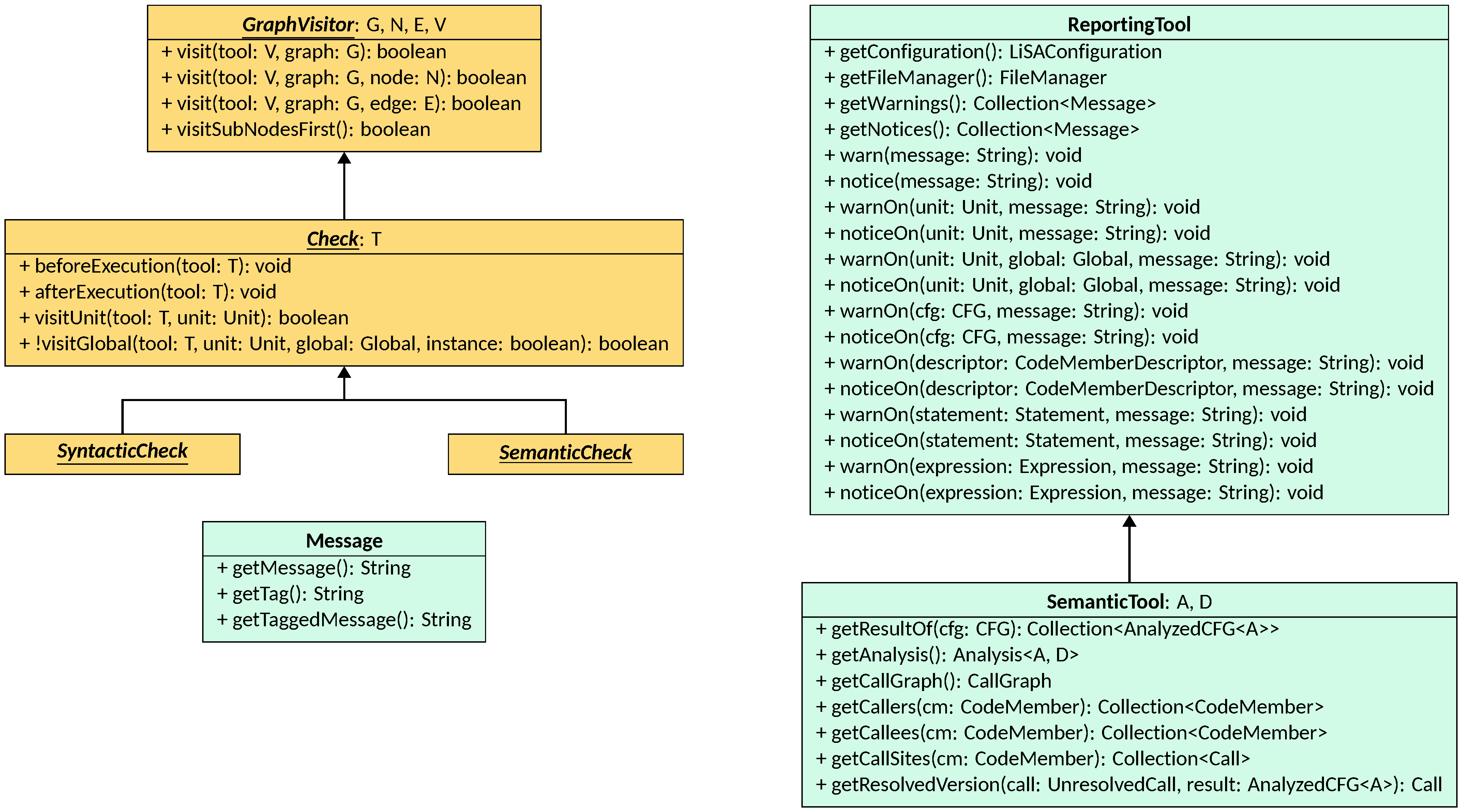
The Message class
A Message represents a piece of textual information that one of the components
of LiSA generated for the user, and that will be included in the results of the
analysis. A message is simply a pair of strings: a tag that is used to
categorize the message, and the core message to deliver. No further structure
is imposed on the message: subclasses might structure the tag or the message
through fields, but those are ultimately included in either.
Finally, getTaggedMessage is a utility method that returns the string "[tag] message".
Tools for reporting issues
Since Checks are not the only component in LiSA that can produce messages,
their creation and collection is centralized in the ReportingTool class. A
ReportingTool instance exposes avenues to access and generate messages, as
well as obtaining the configuration used for the analysis through
getConfiguration and retrieving the FileManager for the analysis through
getFileManager. Using the latter, a Check can create specific output files
to add to the results of the analysis. More details about file generation can be
found in the Outputs page.
Messages are split in two separate collections: warnings and notices. A warning is a message that highlights a potential issue in the analyzed program, such as an uncaught runtime error or a security vulnerability. Instead, a notice is an informative message that can be used either to better interpret the results of the analysis, to inform the user about specific assumptions made by the engine, or to report debug messages that can be used during the development of the analyzer. Examples of notices include the absence of targets for a call (hinting that parts of the application have not been submitted to LiSA for the analysis), or messages reporting that partially supported instructions have been found and their results might not be sound (e.g., purposefully ignoring the generation of some error paths or restricting the targets of reflective calls when parts of the target signature are unknown).
The ReportingTool class provides several methods for adding both warnings and
notices on specific code members or instructions. Each overload of warnOn and
issueOn accepts the code member or instruction, used to customize the tag of
the generated Message instance, and the message to generate.
The class SemanticTool, parametric to the type A extends AbstractLattice<A>
of the lattice instance contained in the states generated by LiSA and to the
type D extends AbstractDomain<A> of the abstract domain executed by LiSA, is a
specialized ReportingTool that also has access to the results of an analysis.
Specifically, given a CFG, it can access all generated results of that CFG
as a collection of AnalyzedCFG instances (read more on the
Interprocedural Analysis page)
through the getResultsOf method. The tool also has a reference to the
Analysis executed, enabling the querying of properties of the states stored in
each AnalyzedCFG through the satisfies method or through the
SemanticOracle methods. Finally, it offers ways to inspect and interact with the
generated CallGraph instance, either by retrieving the instance itself with
getCallGraph or by querying its properties through getCallers,
getCallees, and getCallSites. Moreover, given an AnalyzedCFG, it can
access the resolved version of a given UnresolvedCall through
getResolvedVersion by inspecting the types reaching the call in the
AnalyzedCFG. All these methods are simply proxies for the ones implemented by
the CallGraph class.
The Check interface
The Check interface defines the contract for all checks that can be performed
on the program under analysis. Check inherits from GraphVisitor, an
interface that defines the visitor pattern for arbitrary graphs. Check instead
can only be used on CFGs. It is parametric on the type T of the tool to
use, which is an arbitrary object that is passed to each call to a visit
operation. The two interfaces combined provide the following methods to
implement:
beforeExecution, that is invoked before the start of the visit of the program to perform setup operations;afterExecution, that is invoked after the end of the visit of the program to perform cleanup operations;visitSubNodesFirst, that decides whether the sub-nodes of a compound node (e.g., sub-expressions of a statement) should be visited before or after the node itself;visitUnit, invoked once for eachUnitthat is part of the program;visitGlobal, invoked once for eachGlobalin eachUnitof the program;- a
visitoverload accepting a graph (i.e., aCFGin the case ofChecks), invoked once for eachCFGin the program; - a
visitoverload accepting a statement, invoked once for each statement in the program; - a
visitoverload accepting an edge, invoked once for each edge in the program.
Users of LiSA should not implement the Check interface directly, but rather
implement the SyntacticCheck or SemanticCheck interfaces.
Syntactic Checks
A SyntacticCheck is a Check that fixes its type parameter T to
ReportingTool, and that is thus able to produce warnings, notices, and output
files. It is syntactic since it is executed before the analysis starts, and thus
has no access to any semantic information computed by LiSA. The order of
execution of syntactic checks is not specified and should not be relied upon:
execution might happen in parallel, or sequentially according to some ordering.
For a list of syntactic checks already implemented in LiSA, see the Configuration page.
Semantic Checks
A SemanticCheck is a Check that fixes its type parameter T to
SemanticTool, and that is thus able to produce warnings, notices, and output
files. It is semantic since it is executed after the analysis starts, and thus
has access to all semantic information computed by LiSA. The order of
execution of semantic checks is not specified and should not be relied upon:
execution might happen in parallel, or sequentially according to some ordering.
For a list of semantic checks already implemented in LiSA, see the Configuration page.