
Analysis Events
LiSA provides a flexible mechanism to allow users to hook into the analysis process and execute custom code at specific points during the analysis. This is achieved through an event system that allows users to register listeners to execute either synchronously or asynchronously when an event is triggered. Events represent a more in-depth and fine-grained mechanism to interact with the analysis engine, and specifically with the results of semantic computations, than checks. However, even asynchronous events can have an impact on the overall performance of the analysis, and should be used with care.
This page contains class diagrams. Interfaces are represented with yellow rectangles, abstract classes with blue rectangles, and concrete classes with green rectangles. After type names, type parameters are reported, but their bounds are omitted for clarity. Only public members are listed in each type: the
+ symbol marks instance members, the * symbol marks
static members, and a ! in front of the name denotes a member with a default
implementation. Method-specific type parameters are written before the method
name, wrapped in <>. When a class or interface has already been introduced in
an earlier diagram, its inner members are omitted.
The classes involved in event creation and management are shown in the class diagram below.
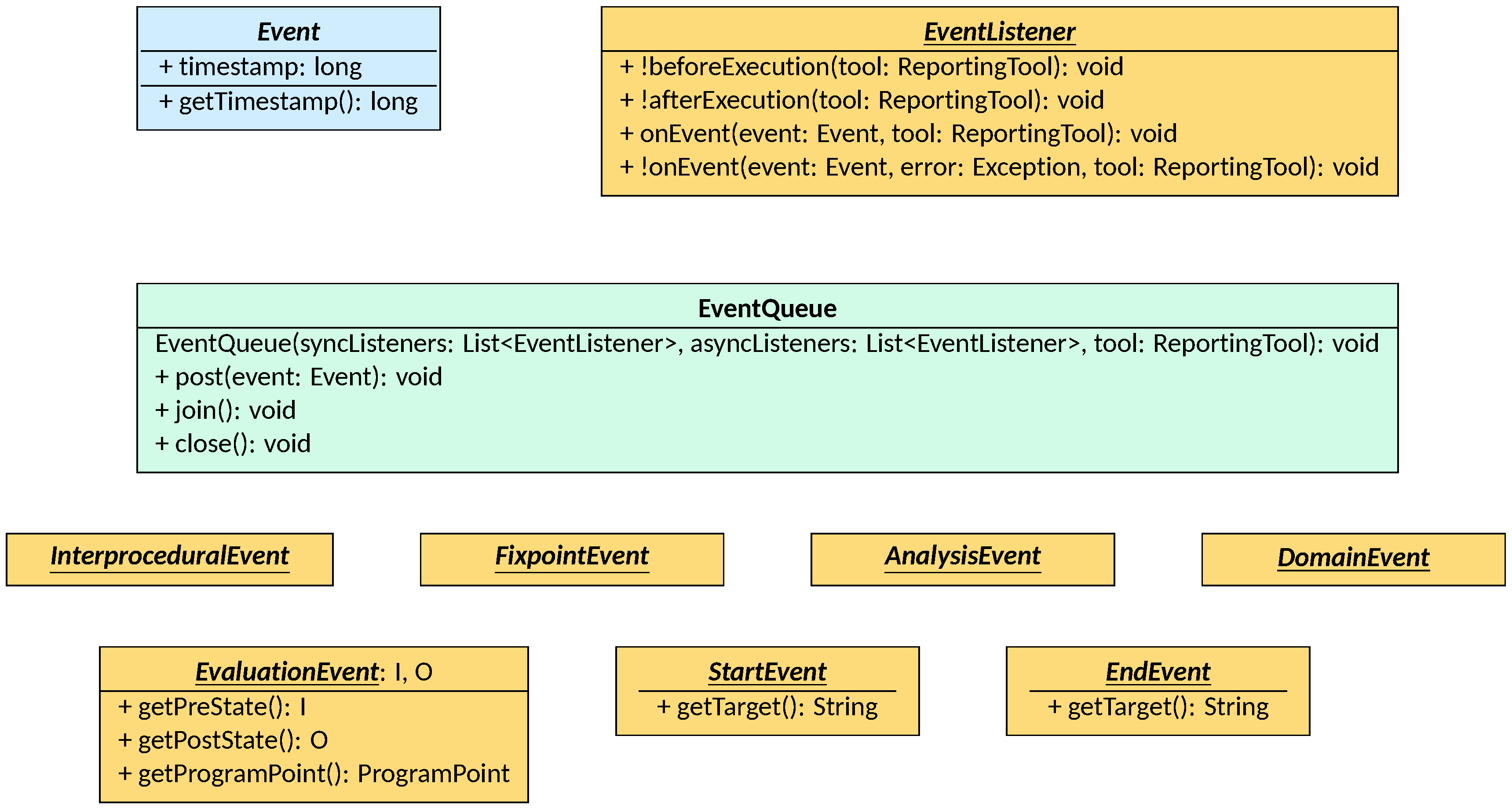
Types of events
Users of LiSA can define their own events by inheriting from the Event class.
Such class only stores and record the timestamp of the creation of the event,
leaving all event-specific information and logic to implementations.
Other than user-defined events, LiSA issues several built-in events during the analysis, which can be used to hook into the analysis process and execute custom code at specific points. A full list of built-in events is available in the Configuration page. These implement few key interfaces that structure their hierarchy allowing for easy identification and handling:
- events issued by the interprocedural analysis (excluding the call graph)
implement the
InterproceduralEventinterface; - events issued by the fixpoint algorithms over individual CFGs implement the
FixpointEventinterface; - events issued by the evaluation of symbolic expressions in the
Analysisclass implement theAnalysisEventinterface; - events issued by either a
SemanticDomainor aSemanticComponentimplement theDomainEventinterface; - for operations that are not atomic (e.g., the evaluation of an assignment,
that will recursively cause the evaluation of the right-hand side and the
left-hand side), two events are issued: a “start” event before the operation,
implementing the
StartEventinterface, and an “end” event after the operation, implementing theEndEventinterface; both interfaces allow for the identification of the operation that is being executed through thegetTargetmethod; - events issued as a result of a semantic evaluation implement the
EvaluationEventinterface, which allows access to the pre- and post-state of the evaluation, as well as the program point where the evaluation took place.
Event listeners
To listen for events, users can implement the EventListener interface. The
interface defines four methods, three of which have a default implementation:
beforeExecutionis called at the start of the analysis, before any event is issued, to perform setup operations; the default implementation does nothing;afterExecutionis called at the end of the analysis, after all events have been issued, to perform cleanup or post-processing operations; the default implementation does nothing;onEventis called whenever an event is issued, and receives the event as a parameter; note that no filtering is performed before the invocation of this method: every event issued during the analysis will be passed to allonEventimplementations, with the latter responsible for filtering unwanted events;onErroris invoked when a call toonEventraises an exception, and receives both the event that caused the exception and the exception itself as parameters for processing it without crashing the whole analysis; the default implementation creates a notice containing the error message and adds it to the analysis results.
Every method above receives a ResultTool as parameter, enabling the generation
of warnings and notices and the access to the FileManager for the analysis to
generate output files.
For a list of event listeners already implemented in LiSA, see the Configuration page.
The EventQueue class
Event management happens in the EventQueue class. An event queue is created
from a list of EventListeners to execute synchronously within the analysis,
and a list of EventListeners to execute asynchronously in a separate thread.
Note that all asynchronous listeners are executed in the same worker thread
sequentially. Upon the arrival of an event, the event is first passed to all
synchronous listeners by invoking their onEvent method, and is then posted on
an event queue. The worker thread will retrieve events from the queue and pass
them to all asynchronous listeners by invoking their onEvent method. If any of
the onEvent methods raises an exception, the onError method of the same
listener is automatically invoked by the queue. Events can be posted to the
queue for processing by invoking the queue’s post method.
The EventQueue class also provides two methods for managing the processing of
events: join blocks the calling thread until all already-posted events have
been processed (note that events posted while the calling thread is blocked
are not waited on), while close first invokes join and then shuts down the
worker thread.
To avoid unnecessary slowdowns, it is advised that any listener that does not need to pause the analysis to process events should be added to the analysis configuration as an asynchronous listener.
Issuing events
To issue an event, components can simply create an event and pass it to the
post method of the queue. A reference to the queue is present in the
interprocedural analysis, in the call graph, inside semantic domains, and inside
the semantic oracle for semantic components to use. These references are lazily
set: they are passed to each analysis component through specific setters or
initialization methods rather than constructors.
Note that if no listeners are set in the analysis configuration, LiSA will not
create an event queue and will not invoke the aforementioned setters or
initialization methods. This is done to avoid unnecessary overhead in event
creation and dispatching when no listeners are present. However, this has the
side effect that all accesses to the event queue reference might return null
if no listeners are present, and thus should be null-checked before use.