
Units
A Unit is a named container that groups together the globals and code members
of a logical program entity. Units represent the structural backbone of a program
in LiSA: they correspond to concepts such as files, modules, classes, and
interfaces, depending on the language being analyzed. Every
CFG and every Global belongs to
exactly one unit. Units are gathered into a Program, and one or more programs
form an Application that LiSA analyzes as a whole.
This page describes the unit hierarchy, from the abstract Unit base class
and its associated globals, through the flat grouping units, up to the
CompilationUnit family that models object-oriented type hierarchies.
This page contains class diagrams. Interfaces are represented with yellow rectangles, abstract classes with blue rectangles, and concrete classes with green rectangles. After type names, type parameters are reported, but their bounds are omitted for clarity. Only public members are listed in each type: the
+ symbol marks instance members, the * symbol marks
static members, and a ! in front of the name denotes a member with a default
implementation. Method-specific type parameters are written before the method
name, wrapped in <>. When a class or interface has already been introduced in
an earlier diagram, its inner members are omitted.
The Unit class
The Unit abstract class is the common base for all units in LiSA. It groups
together a set of globals (variables or constants scoped to the unit) and a
set of code members (functions, methods, or procedures contained in it).
Within a single unit, each global is uniquely identified by its name, and each
code member is uniquely identified by its full signature.
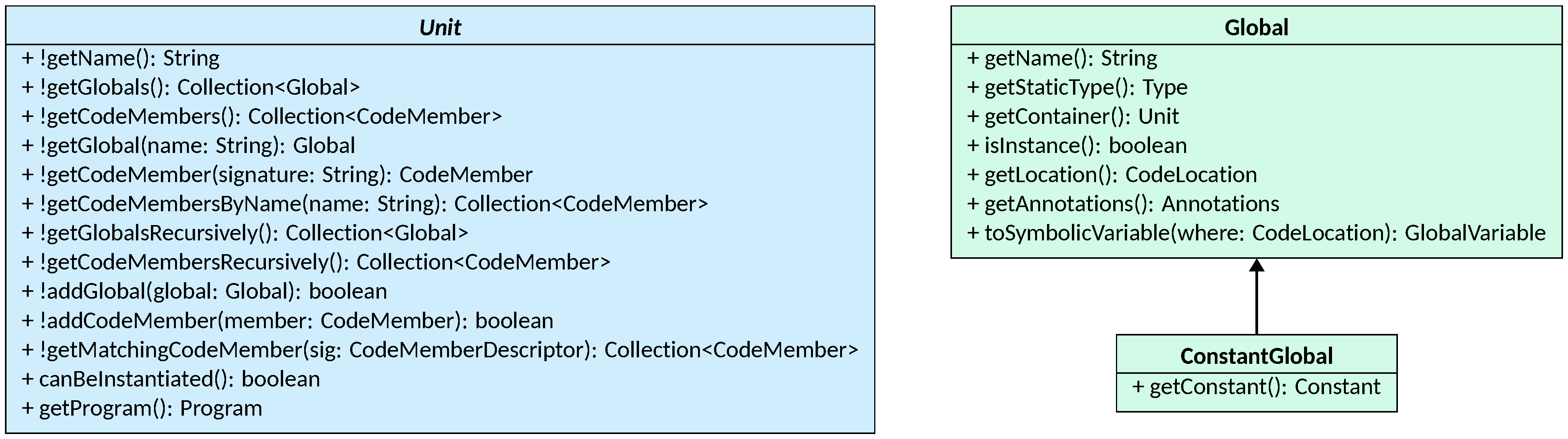
Unit provides a uniform API for accessing and searching its contents:
getGlobals()andgetCodeMembers()return the globals and code members defined directly in the unit, respectively;getGlobal(String)andgetCodeMember(String)look up a specific element by name or signature, returningnullif not found;getCodeMembersByName(String)returns all code members with the given name, regardless of their parameter signature;getGlobalsRecursively()andgetCodeMembersRecursively()return all globals and code members accessible from the unit, including those defined in superunits; subclasses override these methods to add inherited members;addGlobal(Global)andaddCodeMember(CodeMember)register a new element in the unit, returningtrueif the element was added orfalseif one with the same name or signature already existed;getMatchingCodeMember(CodeMemberDescriptor)searches for code members whose signature is compatible with the given descriptor according toCodeMemberDescriptor.matchesSignature, and is used during call resolution.
Two abstract methods complete the interface: canBeInstantiated() returns true
if instances of the unit can be created at runtime (i.e., it is a concrete
class), and getProgram() returns the Program this unit belongs to.
Globals
A Global is a variable or field scoped to a unit. It records the variable’s
name, static type (getStaticType()), source location
(getLocation()), annotations (getAnnotations()), and the unit that
contains it (getContainer()). The isInstance() flag distinguishes instance
fields (belonging to each object of the unit) from static globals (belonging to
the unit itself). Given a CodeLocation, the toSymbolicVariable() method
produces the GlobalVariable symbolic expression used to represent accesses to
the global during the analysis.
A ConstantGlobal is a Global that is bound to a fixed, statically known
value. It extends Global with a getConstant() method that returns the
Constant expression holding that value. Constant globals are never instance
globals: they are always scoped at the unit level. Their static type is
automatically inferred from the type of the constant.
The Program unit
A Program is a Unit that collects all the units composing a single
programming-language program. The main purpose is to act as a registry of all
Unit instances parsed from the program’s source, enriched with the
type system and the language-specific algorithms (e.g., call resolution — more information on the
Types and
Language Features pages)
and the entry points of the analysis. In a Program instance,
globals and code members are typically used to provide always-available built-ins and constants
(e.g., Python’s print function).
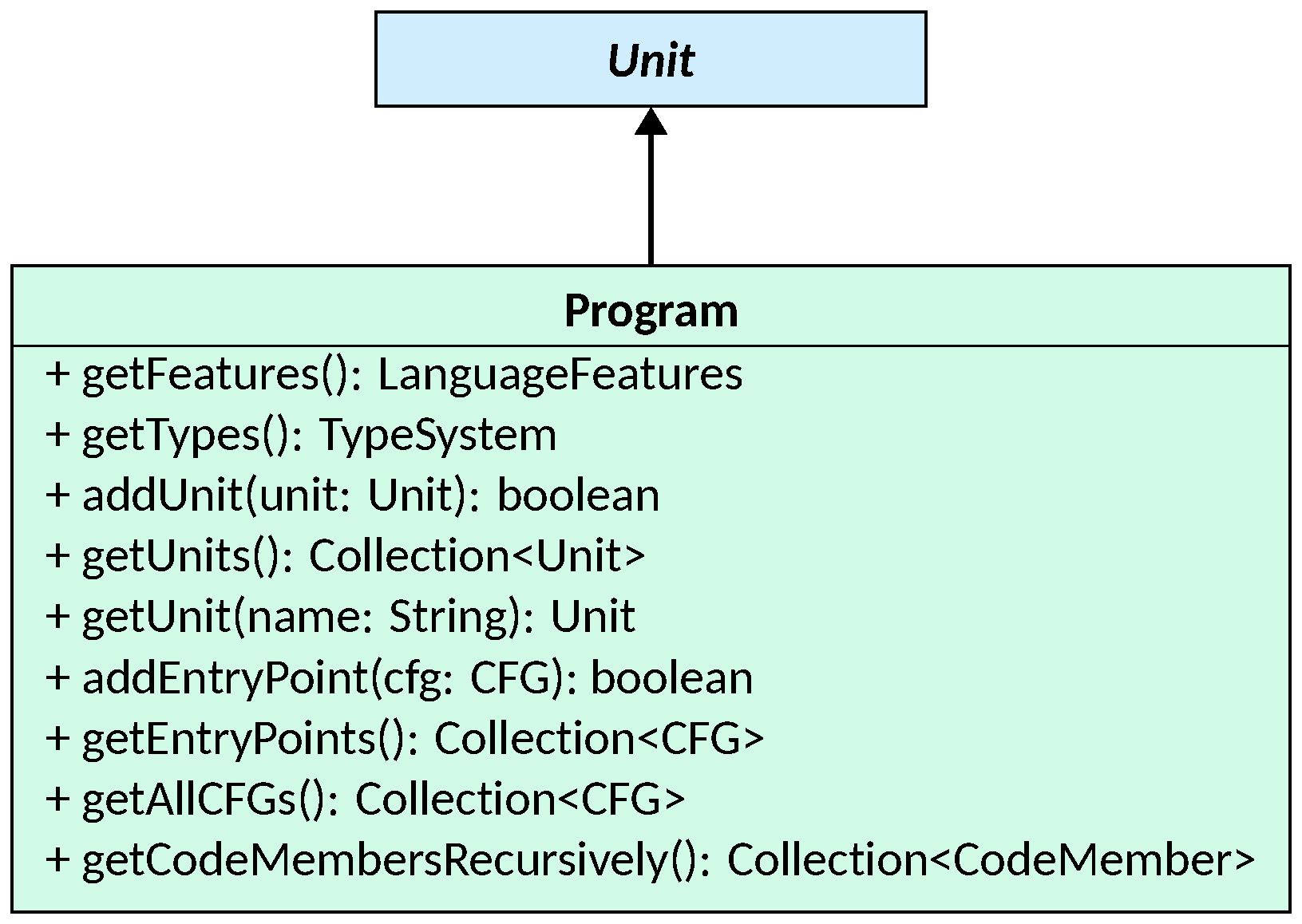
Program provides the following:
addUnit(Unit)andgetUnits()manage the collection of units in the program;getUnit(String)looks up a unit by name;addEntryPoint(CFG)andgetEntryPoints()manage the set of CFGs from which the analysis should start; entry points are typically themainfunctions or other top-level procedures of the program;getAllCFGs()traverses all units recursively and collects everyCFGdefined in the program, providing a global view of the code to analyze;getFeatures()returns theLanguageFeaturesobject that carries language-specific behaviors (such as call resolution strategies, parameter assignment strategies, and validation logic), which are configured by the frontend for the language being analyzed;getTypes()returns theTypeSystemthat knows all the types appearing in the program and provides the type inference logic used during analysis.
Program cannot be added as a unit to another
Program: calling addUnit with a Program instance raises an exception.
Programs are meant to be composed at the Application level.
The Application unit
An Application collects one or more Programs that must be analyzed together.
It is the top-level entry point passed to LiSA’s analysis engine, and it supports
multi-language analysis by allowing programs written in different languages to
coexist.
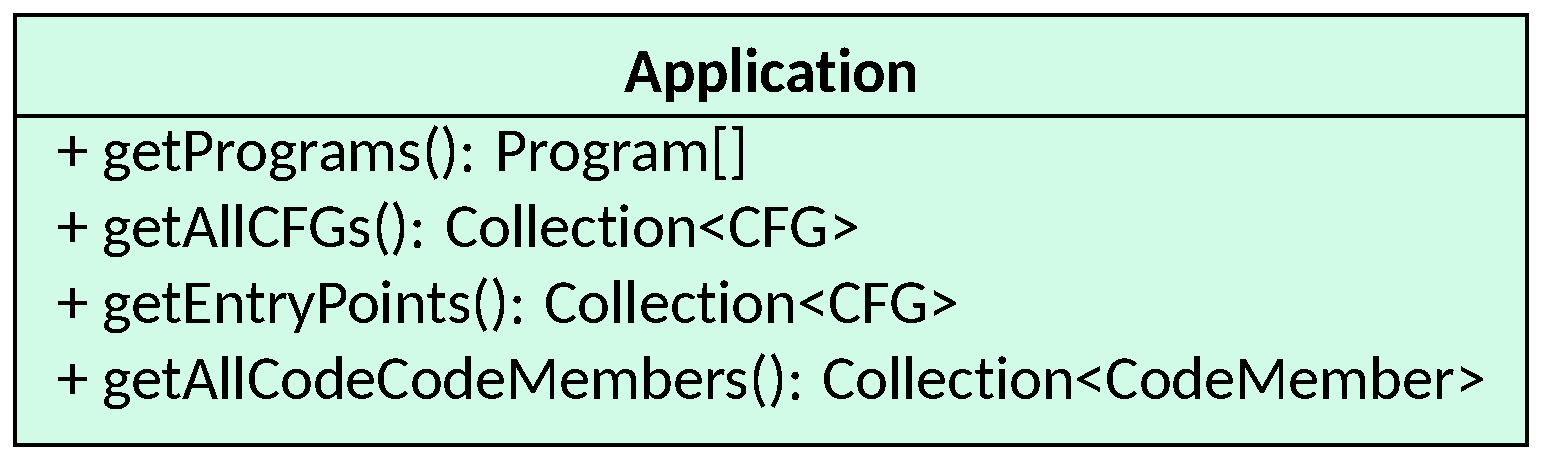
Application provides aggregated views over all its programs:
getPrograms()returns the array of programs composing the application;getAllCFGs()returns all CFGs defined across all programs (lazily computed and cached on first access);getEntryPoints()returns the union of the entry points of all programs;getAllCodeCodeMembers()returns all code members defined across all programs, providing a global view of the callable constructs in the application.
Results are lazily computed and cached on first access, so repeated calls to these methods are cheap.
Units for grouping code
Not every unit in a program corresponds to an object-oriented type. Languages
such as Python, JavaScript, or C use files and modules as the primary unit of
organization, grouping functions and global variables without the notion of
instantiable types. LiSA represents these with two classes that sit below
Unit in the hierarchy but above the compilation-unit family.
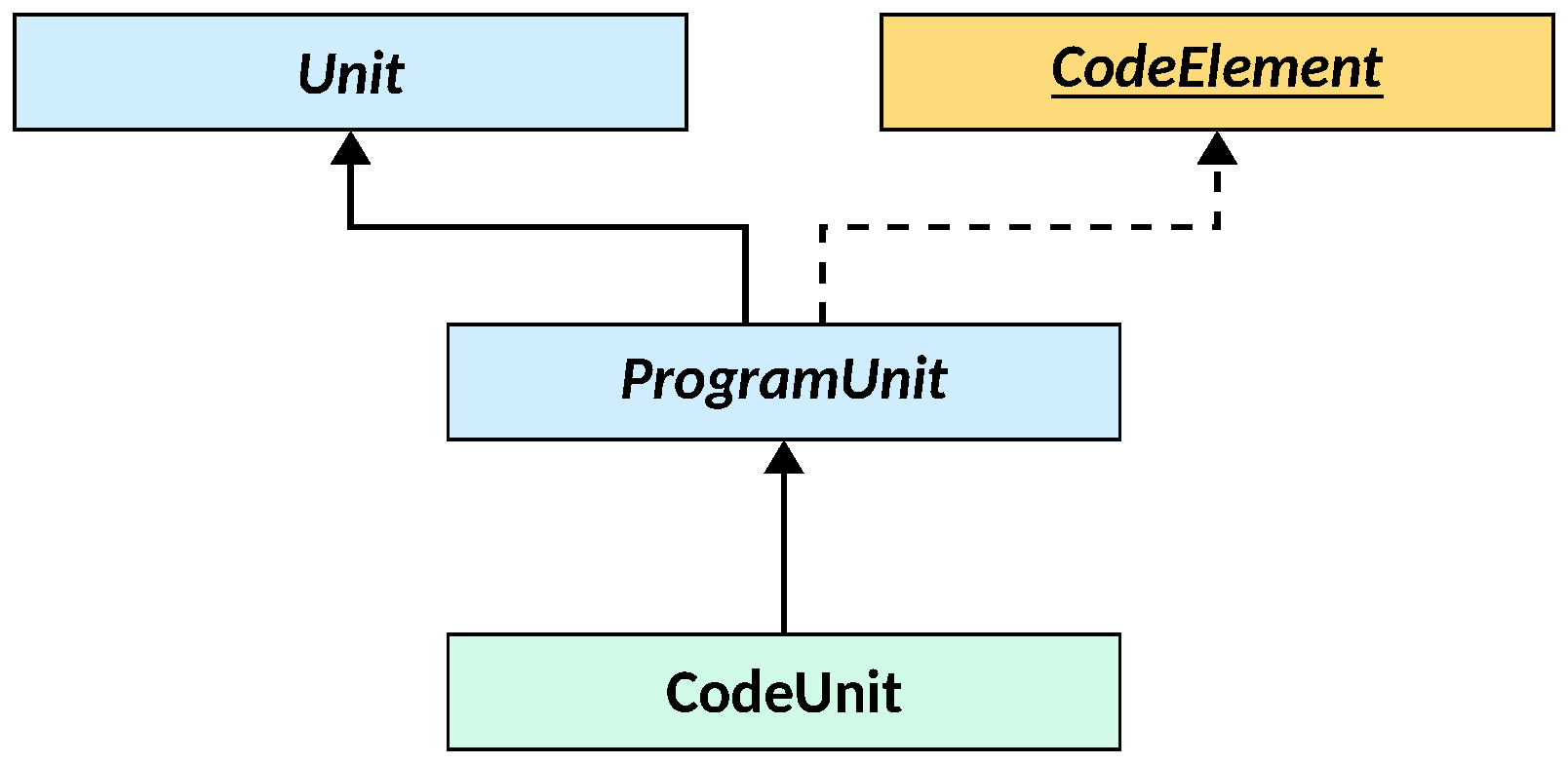
ProgramUnit is the abstract base for all units that can be part of a Program
and have a source location. It extends Unit and also implements CodeElement,
the minimal interface for program constructs with a location (see
Minimal Program Components).
CodeUnit is a concrete, non-instantiable (i.e., whose canBeInstantiated returns false)
ProgramUnit that models a file or
module: a flat container of globals and code members without any inheritance
structure. Frontends
for procedural or scripted languages typically create one CodeUnit per source
file, populating it with the functions and top-level variables defined in it.
Compilation Units
Compilation units model the object-oriented type constructs of a language — classes, abstract classes, and interfaces — that organize code members and globals into an inheritance hierarchy.
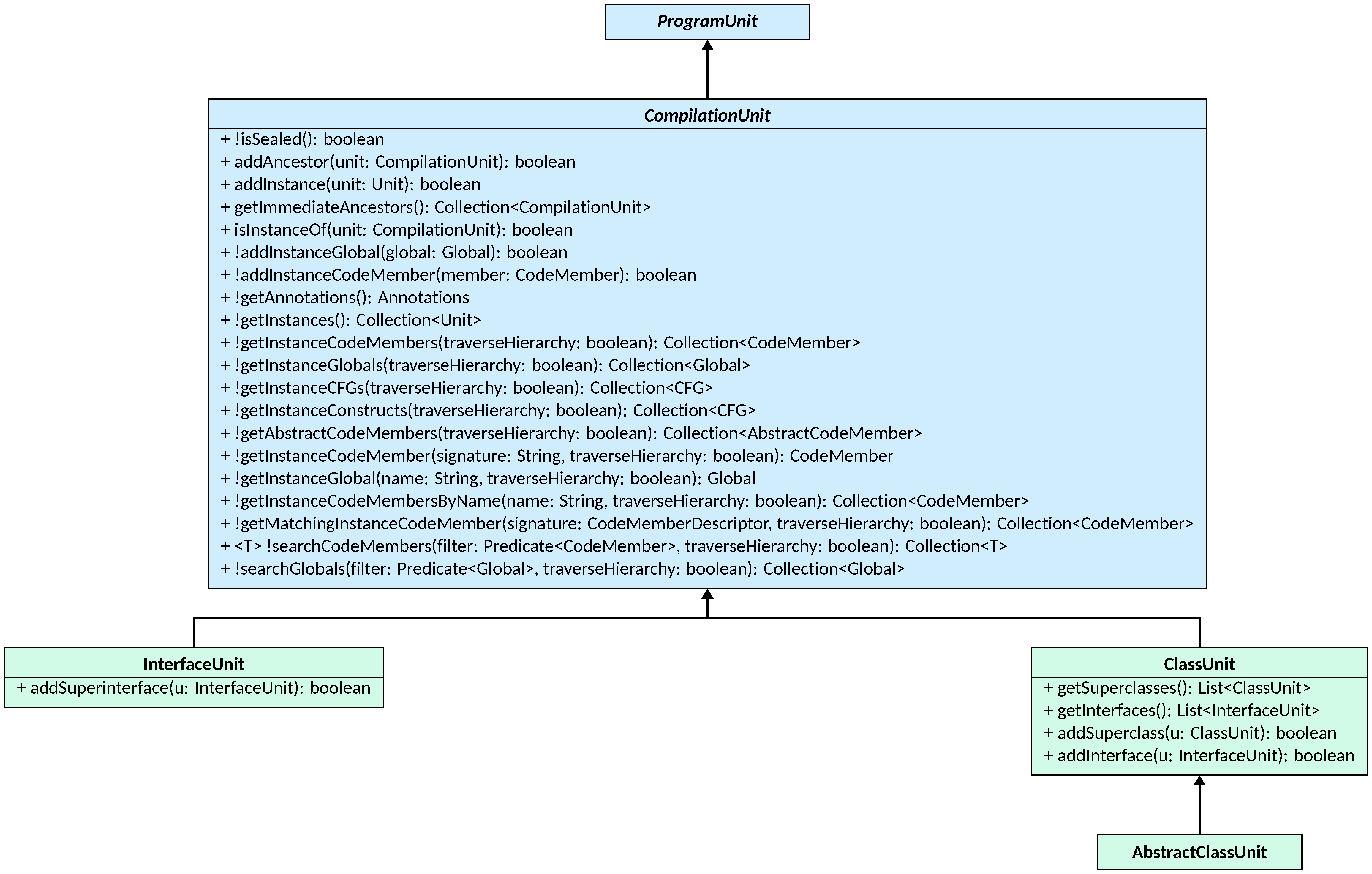
CompilationUnit is the abstract base for all units that participate in an
inheritance hierarchy. It extends ProgramUnit and adds the following
capabilities beyond those of Unit:
- instance members: beyond the static code members and globals tracked by
Unit, aCompilationUnitalso tracks instance code members and globals (those defined on each object rather than on the type itself); all methods ofUnittargeting globals and code members are also defined here for instance code members, with an additional boolean parameter to decide whether the search should be local to the unit or if the type hierarchy should be traversed; - annotations: unit-level annotations are stored and accessible via
getAnnotations(); these are propagated during validation to subunits, following the rules described in the Annotations page; - hierarchy:
getImmediateAncestors()returns the direct superunits of this unit (superclasses and/or superinterfaces), andisInstanceOf(CompilationUnit)checks whether this unit is a subtype of the given one, traversing the hierarchy transitively.getInstances()returns all units that directly or indirectly inherit from this one; theisSealed()flag prevents a unit from being used as a superunit.
Three concrete subclasses implement the different kinds of object-oriented types:
ClassUnitrepresents a concrete class that can be instantiated (canBeInstantiated()returnstrue); it tracks its superclasses (viagetSuperclasses()andaddSuperclass(ClassUnit)) and the interfaces it implements (viagetInterfaces()andaddInterface(InterfaceUnit)); a class may inherit from multiple superclasses and implement multiple interfaces, depending on the language features declared throughLanguageFeatures;AbstractClassUnitis aClassUnitthat cannot be instantiated (canBeInstantiated()returnsfalse); it is used to represent abstract classes, that is, classes which define some abstract code members that must be implemented by concrete subclasses;InterfaceUnitrepresents an interface — a purely abstract type that defines a contract without providing implementations; it cannot be instantiated, and it can only inherit from other interfaces (tracked viaaddSuperinterface(InterfaceUnit)).
When implementing a frontend, choose the unit type that best matches the source language construct:
CodeUnit for files and modules,
ClassUnit for concrete classes, AbstractClassUnit for abstract classes, and
InterfaceUnit for interfaces or traits. Use Program to gather all units of
a single-language program. Application should never be used directly: when
more than one program will be passed to LiSA for the analysis, an Application
object is automatically built.