
Control Flow Graphs
A control flow graph (CFG) is LiSA’s representation of the body of a function,
method, or procedure. The nodes of the graph are
Statement instances, and the
directed edges between them are instances of
Edge
and define the possible flows of execution. Each CFG has
a descriptor that carries its metadata — name, parameters, return type,
annotations, and more — independent of the code body itself. CFGs live inside
Units, which in turn are part of a Program; those are described in their own
documentation pages.
This page describes the building blocks of control flow graphs in LiSA: starting
from the descriptor and the data structures it contains, through the generic graph
infrastructure the CFG builds on, and finishing with the CFG class itself and
its native counterpart.
This page contains class diagrams. Interfaces are represented with yellow rectangles, abstract classes with blue rectangles, and concrete classes with green rectangles. After type names, type parameters are reported, but their bounds are omitted for clarity. Only public members are listed in each type: the
+ symbol marks instance members, the * symbol marks
static members, and a ! in front of the name denotes a member with a default
implementation. Method-specific type parameters are written before the method
name, wrapped in <>. When a class or interface has already been introduced in
an earlier diagram, its inner members are omitted.
Descriptors
The CodeMemberDescriptor class carries all the metadata associated with a code
member — a function, method, or procedure — without containing the body code
itself. It is shared by both CFG and NativeCFG instances, and serves as the
single point of truth for information about a code member’s signature and context.
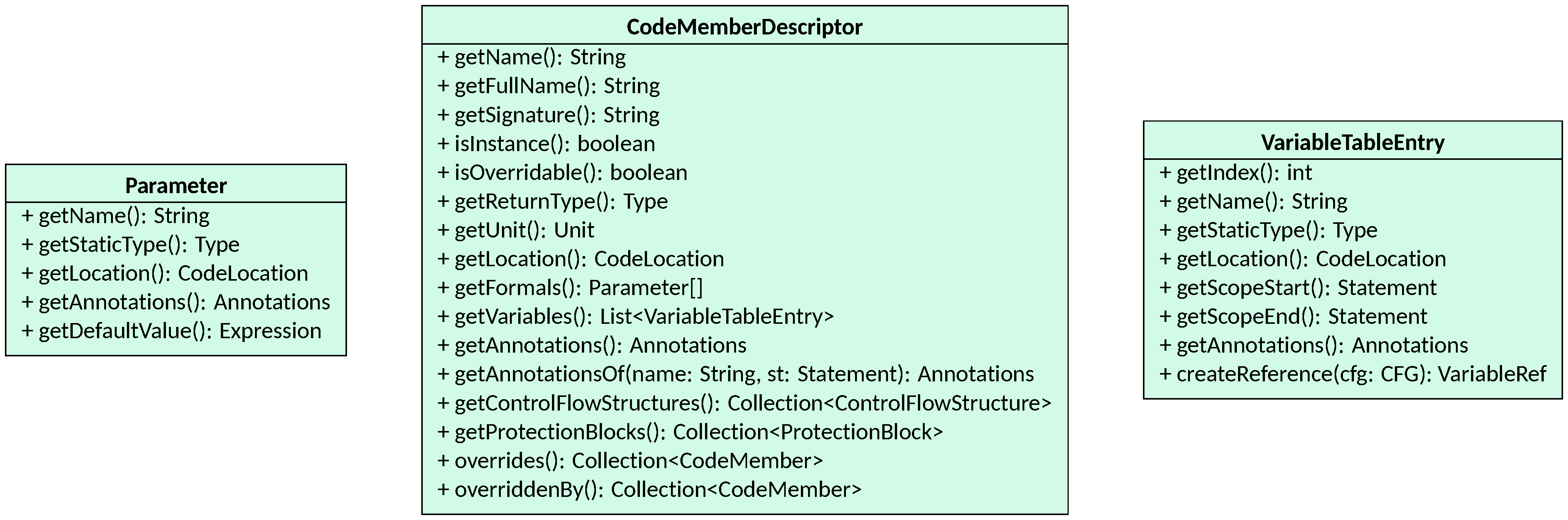
The main information tracked by a CodeMemberDescriptor includes:
- the name and unit of the code member, accessible through
getName()andgetUnit()respectively; the fully qualified name (prefixed by the unit name) is returned bygetFullName(), and the full signature — including parameter types and return type — bygetSignature()andgetFullSignature(); - whether the code member is an instance member (i.e., a method defined on an
object instance) via
isInstance(), and whether it can be overridden by code members in inheriting units viaisOverridable(); instance members are overridable by default, while non-instance ones are not; - the formal parameters, returned as a
Parameter[]bygetFormals(), and the return type, returned bygetReturnType(); - the annotations attached to the code member, accessible through
getAnnotations(), and the annotations of a local variable (including parameters) looked up by name and scope position throughgetAnnotationsOf(String, Statement)(see the Annotations page for details); - the variable table, returned by
getVariables(), which collects all local variables defined in the body of the code member asVariableTableEntryinstances; - the control flow structures and protection blocks extracted from the
body, returned by
getControlFlowStructures()andgetProtectionBlocks()respectively, described below; - the override chain:
overrides()returns the collection of code members that this one overrides (i.e., its counterparts in superunits), andoverriddenBy()returns the collection of code members that override this one in inheriting units; this chain is resolved during program validation.
CodeMemberDescriptor is created by frontends at parsing time and refined during
validation, when annotations are propagated and the override chain is established.
Modifications to a descriptor after validation has completed may lead to
incorrect results.
Formal Parameters
Parameter represents a formal parameter of a code member. Each parameter carries
its name and static type (via getName() and getStaticType()), its
source location (getLocation()), and any annotations attached to it
(getAnnotations()). Optionally, a parameter may have a default value
expression, returned by getDefaultValue(), which is used at call sites that omit
the corresponding argument. The order of parameters in the array returned by
getFormals() matches the order of formal parameters in the source signature.
Local Variables
A VariableTableEntry represents a local variable defined in the body of a code
member. Each entry tracks the variable’s index in the local variable table
(getIndex()), its name and static type (getName(), getStaticType()),
and its source location (getLocation() — the location of its declaration).
Each entry also records the scope
of the variable as a pair of statements: getScopeStart() returns the first
statement where the variable is visible, and getScopeEnd() the last, both
of which may be null when the variable is visible throughout the entire code
member. Given a CFG, the createReference(CFG) method builds the VariableRef
expression that syntactically accesses the variable. Annotations on local
variables are accessible via getAnnotations(), and are looked up by the
descriptor’s getAnnotationsOf method to resolve annotation queries by variable
name within the correct scope.
Information on local variables is optional: its main purpose is to track annotations and to provide scoping logic. If not provided, all variables are assumed to have no annotations and to be visible throughout the entire code member they are defined in.
Error Handling Blocks
Error handling blocks encode the exception-handling structure of a code member,
such as Java’s try/catch/finally construct. LiSA represents these through
three classes.

A ProtectionBlock is the top-level container for a single exception-handling
construct. It groups together the different parts of the construct by providing
access to them:
getTryBlock()returns theProtectedBlockrepresenting the body of the protected region (thetryblock);getCatchBlocks()returns the list ofCatchBlocks attached to this construct;getElseBlock()andgetFinallyBlock()return the optionalProtectedBlocks representing theelseandfinallybranches, respectively (both may benullif absent); anelseblock is executed only if no exception is raised in thetryblock, while afinallyblock is executed regardless of whether an exception is raised or not.
Instead, getFullBody(CFG) returns the full collection of statements covered by this
protection block across all its parts.
A ProtectedBlock represents a contiguous region of code within an
exception-handling construct: the try body, the else clause, the
finally clause, or the body of a catch block. It tracks the first and last
Statement delimiting the region
through getStart() and getEnd(), and the getBody() method returns all the
statements contained within it. Two boolean methods, canBeContinued() and
alwaysContinues(), describe whether normal execution can exit the block and
whether it always does so, respectively; these are used when analyzing the
reachability of statements after the construct.
A CatchBlock is a specialization of the error-handling construct for a single
catch clause. In addition to the body (a ProtectedBlock accessible via
getBody()), it records the exception types it handles, returned by
getExceptions(), and the identifier that names the caught exception within
the block, returned by getIdentifier(). The connection between protection
blocks and the ErrorEdge type (which transfers control to the appropriate
catch block when an error is raised) is described in the
Statements, Expressions, and Edges
page.
Control Flow Structures
Control flow structures encode the high-level syntactic constructs — loops and
conditionals — that organize the statements inside a CFG. They are stored in the
descriptor’s getControlFlowStructures() collection and can be populated either
by the frontend at parse time or inferred heuristically from the CFG’s edge
structure.
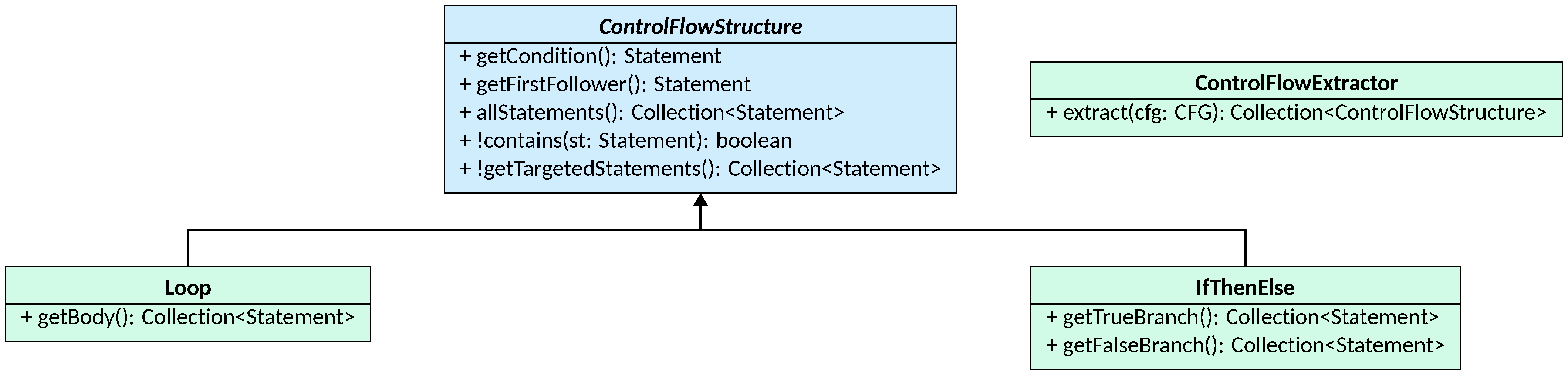
The abstract ControlFlowStructure class is the common base for all such
structures. Each instance is anchored to a condition statement (the guarding
expression of the construct, returned by getCondition()) and a first follower
(the first statement after the structure exits, returned by getFirstFollower()).
The allStatements() method returns all statements covered by the structure,
including the condition and first follower, while getTargetedStatements() returns
only those that are directly part of the structure’s body and that are the
target of a conditional edge. The contains(Statement)
method tests whether a given statement belongs to the structure.
Two concrete subclasses are provided:
Looprepresents an iterative construct; it exposesgetBody(), which returns the collection of statements forming the body of the loop;IfThenElserepresents a conditional branching construct; it exposesgetTrueBranch()andgetFalseBranch(), which return the collections of statements in the then and else branches, respectively.
When frontends cannot provide control flow structures directly (e.g., because the
source language uses low-level jump instructions), the ControlFlowExtractor class
can be used (or extended) to infer them heuristically from the CFG’s edges. Its extract(CFG)
method uses a dominator-based algorithm to find loops (via back edges) and a
graph-visiting heuristic to identify IfThenElse structures. The result is a
collection of ControlFlowStructure instances that can be passed to the
descriptor for storage.
Information on control flow structures is optional: its main purpose is to drive optimized fixpoints and provide additional information to checks. If not provided, optimized fixpoints will not be available.
Heuristic extraction is a best-effort process. CFGs with arbitrary jumps (e.g.,
goto, break, or continue that exit
multiple levels) may cause the extractor to miss or misidentify some structures.
It is always preferable to have frontends supply control flow structures
directly from source information.
Code Members
A code member is any program construct that has a body of code and a signature.
In LiSA, all code members implement the CodeMember interface, which requires the implementation of a
single method: getDescriptor(), returning the CodeMemberDescriptor that
carries the code member’s metadata. The validate() default method can be
overridden to enforce well-formedness checks on the code member’s structure.
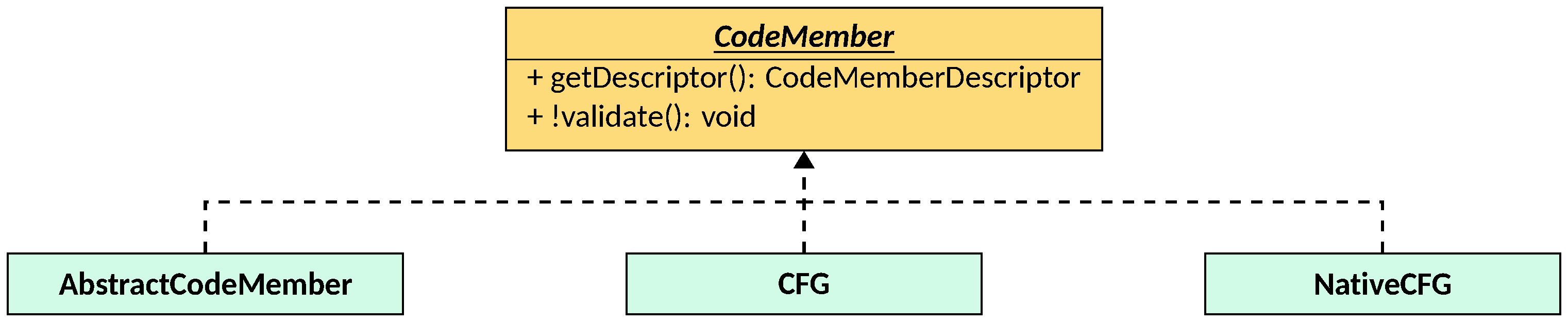
Three classes implement CodeMember:
CFG, representing a code member whose body is a full control flow graph (the subject of the Control Flow Graphs section);NativeCFG, representing a code member whose semantics is provided by a pluggable expression rather than a graph (described in the Native Code section);AbstractCodeMember, a lightweight stub for code members that have a signature but no body — such as abstract methods in an abstract class or interface methods. It is simply a wrapper around aCodeMemberDescriptor, providing no additional logic beyond the descriptor access required byCodeMember.
Graphs Containing Code
LiSA’s CFG builds on a generic, reusable graph infrastructure defined in the
it.unive.lisa.util.datastructures.graph.code package. This infrastructure
provides the data structures and interfaces needed to represent directed graphs
whose nodes and edges are ordered and comparable, without making any assumption
about the specific types of nodes and edges used.
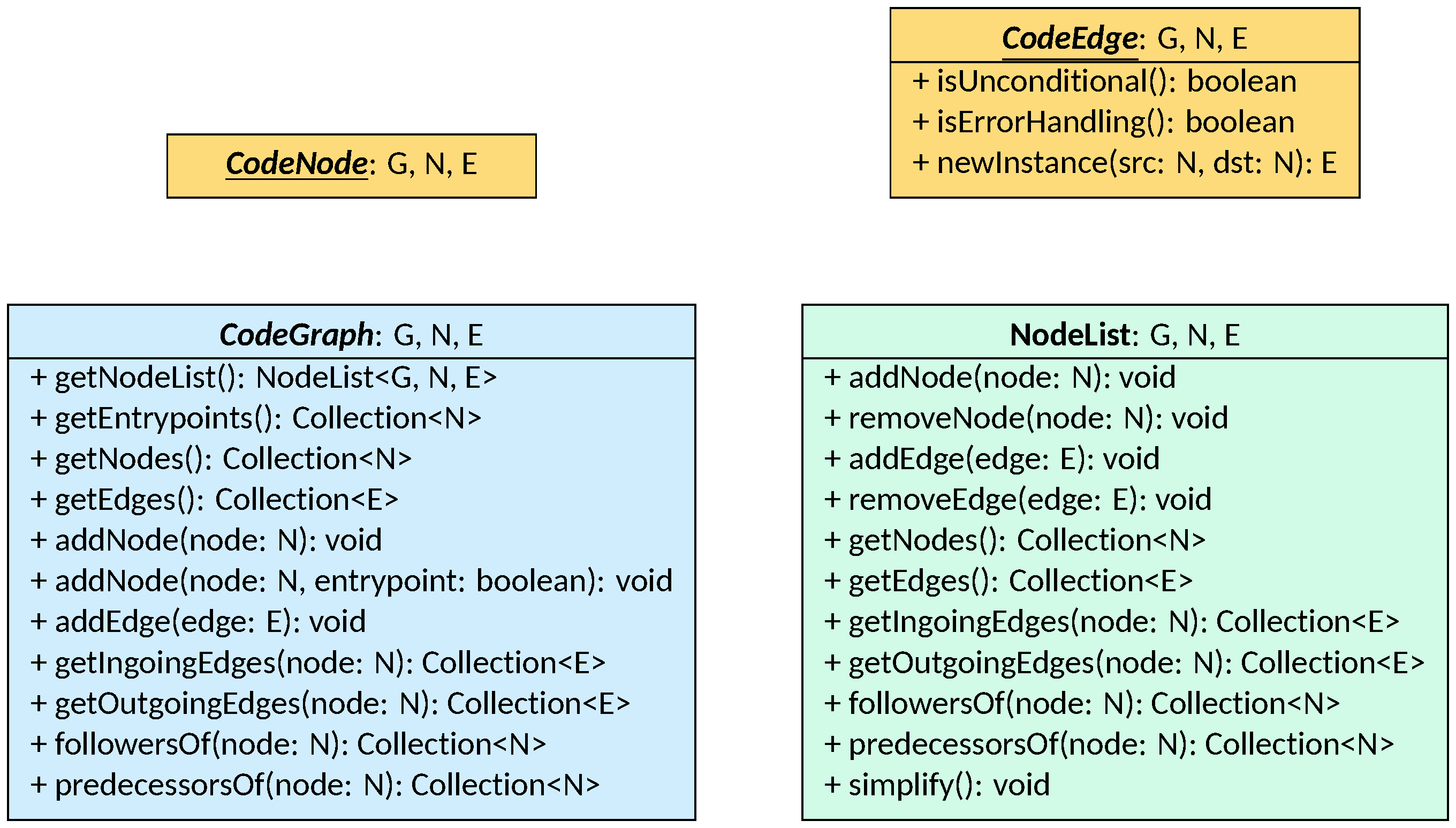
The CodeNode<G, N, E> and CodeEdge<G, N, E> interfaces are the marker
interfaces for nodes and edges of a CodeGraph. Both extend their respective
base interfaces from the generic graph package (Node and Edge) and add a
Comparable constraint, so that nodes and edges can be ordered within the graph.
CodeEdge further defines three methods shared by all edge implementations:
isUnconditional() (whether the edge is always traversed), isErrorHandling()
(whether the edge transfers control to an error handler), and newInstance(N, N)
(which produces a copy of the edge connecting different nodes, used during graph
simplification).
The CodeGraph<G, N, E> abstract class is the central data structure. It is
parametric to the concrete graph type G, the node type N (constrained to
CodeNode<G, N, E>), and the edge type E (constrained to CodeEdge<G, N, E>).
The graph manages its nodes and edges through an internal NodeList<G, N, E>,
accessible via getNodeList(). The main operations available on a CodeGraph
are:
- construction:
addNode(N)adds a node, with an optional boolean flag to mark it as an entrypoint of the graph;addEdge(E)adds an edge; - navigation:
getNodes(),getEdges(),getEntrypoints()provide access to the graph’s contents;getIngoingEdges(N),getOutgoingEdges(N),followersOf(N), andpredecessorsOf(N)navigate the local neighborhood of a given node; - querying:
containsNode(N),containsEdge(E),getEdgeConnecting(N, N), andgetEdgesConnecting(N, N)check membership and retrieve specific edges.
The NodeList<G, N, E> class implements the underlying adjacency structure of
the graph and handles all the low-level bookkeeping: insertion and removal of
nodes and edges, and efficient lookup of neighbors. It also provides a
simplify() method that removes nodes connected by unconditional edges (i.e.,
nodes whose only incoming and outgoing edges are isUnconditional()) and rewires
their neighbors directly, reducing the number of nodes in the graph without
changing its semantics.
Control Flow Graphs
The CFG class is LiSA’s main representation of the body of a function, method,
or procedure. It instantiates the CodeGraph<G, N, E> abstraction as
CodeGraph<CFG, Statement, Edge>, using Statement instances as nodes and
Edge instances as edges. It also implements CodeMember, connecting it to the
descriptor-based metadata system.
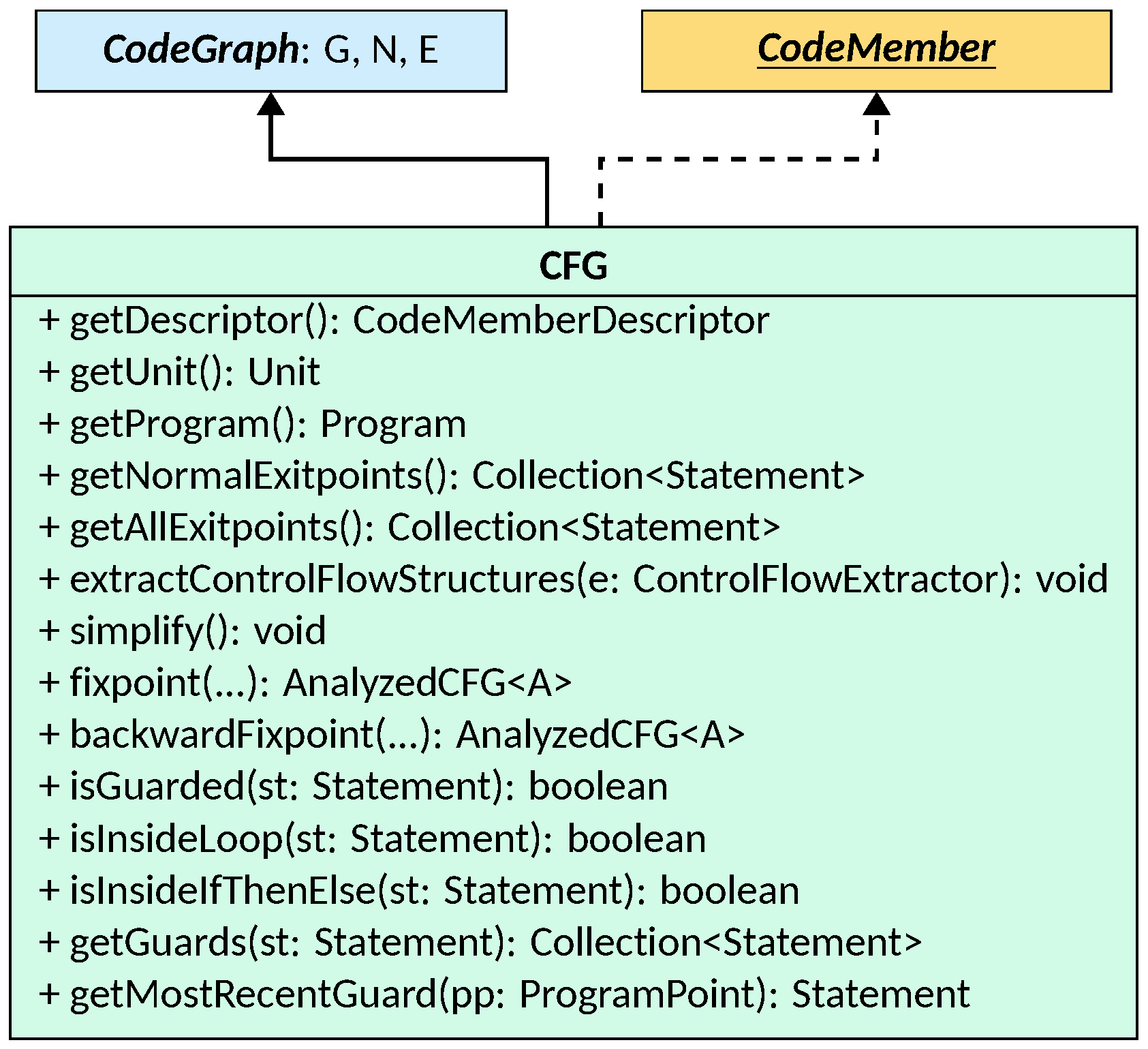
Beyond the graph operations inherited from CodeGraph, the CFG class provides
the following:
- descriptor and context:
getDescriptor()returns theCodeMemberDescriptorcarrying the CFG’s metadata.getUnit()andgetProgram()give direct access to theUnitandProgramthat contain this CFG without having to navigate through the descriptor; - exit points:
getNormalExitpoints()returns the statements from which normal (non-exceptional) execution exits the CFG — typicallyreturnstatements.getAllExitpoints()additionally includes statements that stop execution by raising an error; the distinction matters when reasoning about the final state of the CFG: normal and error exits correspond to different continuations in theAnalysisState; - simplification:
simplify()removes redundantNoOpstatements from the graph (those connected only by unconditional edges) by delegating to the underlyingNodeList; frontends may insertNoOpstatements as placeholders during construction, andsimplify()should be called once construction is complete; - control flow structure extraction:
extractControlFlowStructures(ControlFlowExtractor)invokes the given extractor on this CFG and stores the resultingControlFlowStructureinstances into the descriptor; this method should be called only when the frontend has not provided structures directly; - fixpoint computation:
fixpoint(...)andbackwardFixpoint(...)run a forward or backward fixpoint computation on this CFG using the given entry state and interprocedural analysis, returning anAnalyzedCFGwith the per-statement analysis results; these methods are typically invoked by LiSA’s analysis engine rather than by users directly; - guard queries:
isGuarded(Statement),isInsideLoop(Statement), andisInsideIfThenElse(Statement)check whether a given statement is guarded by a conditional or iterative construct; the correspondinggetGuards(Statement),getLoopGuards(Statement), andgetIfThenElseGuards(Statement)return the collections of guard statements that dominate the queried statement, whilegetMostRecentGuard(ProgramPoint)and its specialized variants return only the innermost guard; these are used, for instance, by taint analyses to detect implicit flows through branching conditions.
Native Code
Not all code members that LiSA must reason about have a body that can be represented as a control flow graph. Standard library functions, runtime primitives, and other external constructs may be provided as native code members whose semantics is expressed directly as a pluggable expression rather than as a graph.
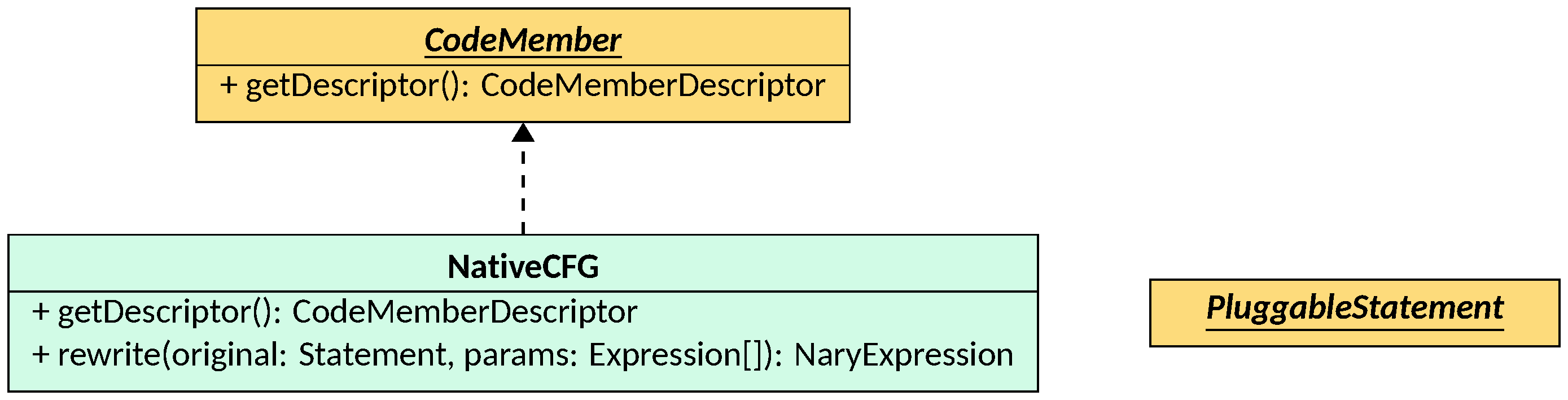
A NativeCFG is a CodeMember that has only a CodeMemberDescriptor and no
body. Its semantics is captured by a NaryExpression class that must also
implement the PluggableStatement interface, passed to the NativeCFG
constructor as a Class object. When a call to a native CFG is encountered
during analysis, the rewrite(Statement, Expression...) method is invoked: it
uses reflection to call the build(CFG, CodeLocation, Expression[]) static
factory method of the construct class, producing a NaryExpression that
replaces the original call and whose forward semantics implements the intended
behavior. The PluggableStatement interface’s setOriginatingStatement(Statement)
method is also called on the resulting expression, linking it back to the call
that triggered the rewrite.
To implement a native construct, create a class that extends a suitable
NaryExpression subclass and also implements
PluggableStatement. Provide a public static build(CFG, CodeLocation, Expression[])
factory method, define the semantics in forwardSemanticsAux, and pass the class
to the NativeCFG constructor. LiSA will take care of the rest.
NativeCFGs avoid the submission of library code to the analysis, which in
turn reduces the complexity of the analysis. The semantics of a library function
is expressed as if it were a single instruction, that is effectively inlined at the call site,
without the need to analyze its internal code line by line. This also means that
NativeCFGs will not have a corresponding AnalyzedCFG available in the analysis results.