
Frontends and Code Parsing
A frontend is the component that translates a source program into LiSA’s
internal representation: a
Program
object populated with
Units,
CFGs,
Globals,
Types,
and entry points. Writing a frontend is how you make LiSA
analyze a new programming language. The specifics are highly language-dependent,
but the overall process follows a common pattern.
This page describes the pieces that, in our experience, every
frontend must provide and the recommended patterns for structuring the
translation process.
The overall workflow is:
- parse the source into an abstract syntax tree (AST) or other intermediate form using a suitable parser;
- build the program skeleton: create a
Programwith the language-specificTypeSystemandLanguageFeatures; - inspect the generated ASTs in at least two passes (more of them can be added
for clearer separation of concerns, but at least two are needed for languages
that define custom data types):
- first pass — type hierarchy: traverse the AST to create all
Unitobjects and their respective types, so that type names are known before any method signature is inspected; - second pass — code members: revisit each unit to create
CFGs for every method and function, building the node/edge graph statement by statement;
- first pass — type hierarchy: traverse the AST to create all
- add library stubs: attach
NativeCFGs for library functions that have no source; - register entry points and return the finished
Program.
After all the above steps have completed, the frontend can execute LiSA as described in the Configuration page.
This page contains class diagrams. Interfaces are represented with yellow rectangles, abstract classes with blue rectangles, and concrete classes with green rectangles. After type names, type parameters are reported, but their bounds are omitted for clarity. Only public members are listed in each type: the
+ symbol marks instance members, the * symbol marks
static members, and a ! in front of the name denotes a member with a default
implementation. Method-specific type parameters are written before the method
name, wrapped in <>. When a class or interface has already been introduced in
an earlier diagram, its inner members are omitted.
Parsing
The first task of any frontend is to reduce the source text to a structured form that can be traversed. LiSA imposes no constraint on the parser technology, so the choice depends on the target language.
ANTLR4
The most common approach across LiSA frontends (IMP, Go, Python, EVM) is to
write an ANTLR4 grammar and generate a visitor from
it. A collection of well-maintained and ready-to-use grammars is available on
GitHub.
ANTLR4 grammars are typically split into a lexer grammar (MyLangLexer.g4)
and a parser grammar (MyLangParser.g4), placed under
src/main/antlr/ in the Maven/Gradle project. Official plugins for both build
systems automatically generate Java classes from the grammar at compile time.
For Gradle, which is the build system of choice for LiSA and its frontends,
add the following to build.gradle:
plugins {
  id("antlr")
}

generateGrammarSource {
  maxHeapSize = "64m"
  arguments += ["-visitor", "-no-listener"]
  outputDirectory = new File("${project.buildDir}/generated-src/antlr/main/your/target/package")
}
The ANTLR4 plugin generates a
MyLangParserBaseVisitor<Object> class that the frontend subclasses.
The top-level entry point of the frontend extends MyLangParserBaseVisitor<Object>,
overrides visitFile (or the equivalent root rule), and drives the two-pass
traversal from there. Each visit method returns a value — often a
ParsedBlock, a Statement, an Expression, or null — that the caller
assembles into the larger CFG structure.
Language-Specific Parsers
For languages that have a mature Java-based parser, using it directly avoids the
effort of maintaining a grammar. The Java frontend
(JLiSA) uses the Eclipse Java
Development Tools (JDT) AST, accessed through the org.eclipse.jdt.core
library. The JDT AST covers the full Java language and handles all
disambiguation and name-binding that would be difficult to express in a pure
grammar.
When using a foreign AST, the frontend implements the corresponding visitor
interface (e.g. ASTVisitor in JDT) instead of an ANTLR-generated one, but
the two-pass structure and CFG construction patterns described below apply
unchanged.
Bytecode and IR Parsers
For compiled languages or virtual machines there may be no source text to parse.
The EVM frontend (EVM-LiSA) feeds
an ANTLR4 grammar directly over the textual bytecode representation, producing
one opcode node per instruction in a single pass. Other possible approaches
include parsing JVM .class files with ASM, or reading LLVM bitcode with a
Java binding.
It is also possible to use parsers in languages different from Java, e.g. a Python-based parser for Python source. In that case, the parser must serialize the final
Program structure, and a Java-based
application can then deserialize it and pass it to LiSA. However, instruction
semantics, types, and other features required by LiSA must still be developed
in Java, as the library has to be run in a Java process.
Defining Types
Every value in a LiSA program has a
Type,
and the full set of types that can
appear in the program must be registered in the
TypeSystem
before the analysis
starts. Types are defined and registered in two steps: implementing the type
classes, then registering them into the Program.
A language-specific TypeSystem must be created in each frontend, implementing
the specifics of that language’s type system.
Each type that can appear in the program must be registered through the
TypeSystem.registerType(type) before the analysis starts. The recommended
pattern is:
- for well known types such as primitive types, create static singleton instances, use those instances while parsing the code, and register that instance directly;
- for user defined types (e.g., arrays or objects), maintain a static registry
per type family during parsing (e.g.
MyClassType.register(name, unit)adds to a static map;MyClassType.lookup(name)retrieves an existing type instance, andMyClassType.all()returns the accumulated set); this lets type names be (i) registered during the first pass, (ii) looked up by name during the second pass, and (iii) retrieved as a complete set at the end of parsing for registration into the program.
Types must be fully registered before the
validateAndFinalize call that the analysis engine triggers internally. Register
all types immediately after both passes are complete.
The Two-Pass Approach
For languages that can define their own data types, the frontend must traverse the AST twice. The reason is that the second pass builds method signatures that reference types (parameter types, return types, field types), and those types are introduced by class and interface declarations that may appear anywhere in the source — including after the method that references them. A single pass cannot resolve these forward references.
First Pass: Building the Type Hierarchy
The first pass visits every type declaration in the source and, for each one:
- creates the appropriate
Unitsubclass:ClassUnitfor concrete classes (new ClassUnit(location, program, name, sealed));AbstractClassUnitfor abstract classes;InterfaceUnitfor interfaces or traits;CodeUnitfor files and modules in procedural or scripted languages;
- adds the unit to the program:
program.addUnit(unit); - creates the corresponding type (if the language associates a type with the unit) and records it in a static registry;
- does not wire inheritance or other cross-type relationships yet — some type names may not have been seen.
After the first pass is complete (or at the very end of it, if the source
guarantees declarations precede uses), inheritance links are wired by calling
unit.addAncestor(superUnit) for each resolved supertype. Unit-level globals
can also be added at this stage, since their types are now known.
Second Pass: Filling Code Members
The second pass revisits every unit and, for each code member (method, constructor, function, procedure):
- builds a
CodeMemberDescriptorwith the member’s name, return type, formal parameters, and enclosing unit; - creates a
CFGfrom the descriptor:new CFG(descriptor); - adds the CFG to the unit:
unit.addCodeMember(cfg)for static members, or;unit.addInstanceCodeMember(cfg)for instance methods;
- constructs the CFG body (see the next section).
Abstract method stubs — declared but without a body — are represented as
AbstractCodeMember objects created from a descriptor and added with
unit.addInstanceCodeMember(acm).
For languages like Python or JavaScript where classes are not declared at the top level but created dynamically, a strict two-pass separation may not apply. In those cases, create and register a
CompilationUnit for each class on the fly when it is first encountered during
a single traversal, and rely on the forward-declaration behaviour of the
frontend’s type registry to resolve self-references.
Building CFGs
Once a CFG has been created from its descriptor, its body must be populated
with Statements connected by Edges.
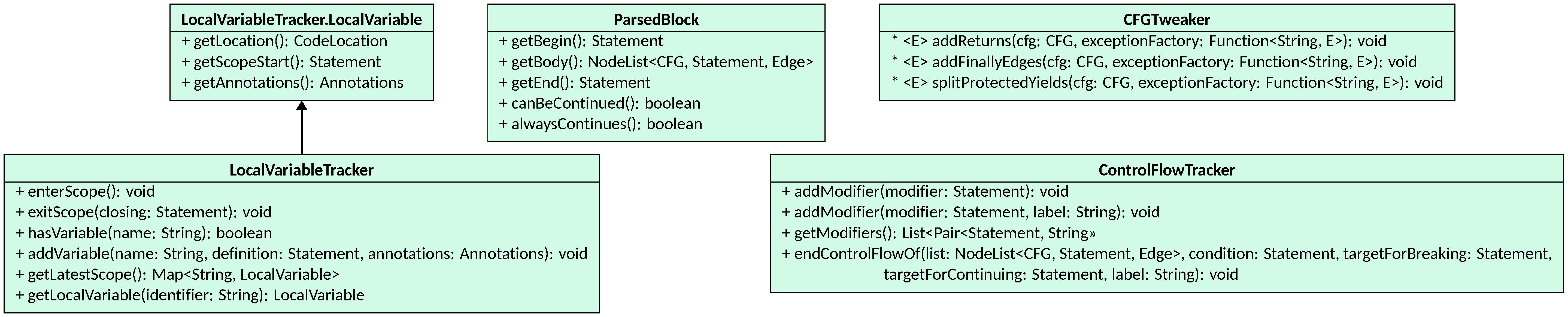
LiSA offers some utility classes in it.unive.lisa.util.frontend to ease the parsing:
ParsedBlock
ParsedBlock is the canonical return type for visitor methods that build a
fragment of a CFG. It carries three fields:
getBegin()— the first statement to execute when entering the block;getBody()— theNodeListcontaining all statements and edges of the block;getEnd()— the last statement on the “normal” exit path (may benullif the block always terminates via a return or throw).
canBeContinued() returns true if the end statement exists and does not stop
or redirect execution, meaning code can follow the block on the normal path.
alwaysContinues() additionally checks that no statement inside the block
stops or redirects execution on any path.
The aim of ParsedBlock is to ease the composition of CFG bodies from smaller
fragments. A typical usage starts from building a Statement for a single
instruction:
Statement st = /* visit of the AST to build a single statement instance */;
NodeList<CFG, Statement, Edge> adj = new NodeList<>(new SequentialEdge());
adj.addNode(st);
return new ParsedBlock(st, adj, st);
Then, when visiting a block of code, several ParsedBlocks can be composed together:
NodeList<CFG, Statement, Edge> block = new NodeList<>(new SequentialEdge());
Statement first = null, last = null;
boolean canProceed = true;
for (int i = 0; i < numberOfStatements; i++) {
    if (!canProceed)
        /* raise an error: unreachable code after a return or throw */
    ParsedBlock st = visitStatement(/* retrieve the i-th statement's AST node */);
    block.mergeWith(st.getBody());
    if (first == null)
        first = st.getBegin();
    if (last != null)
        block.addEdge(new SequentialEdge(last, st.getBegin()));
    last = st.getEnd();
    canProceed = st.canBeContinued();
}

if (first == null && last == null) {
    // empty block: instrument it with a noop
    NoOp instrumented = new NoOp(
            cfg,
            new SourceCodeLocation(file, getLine(ctx.LBRACE()), getCol(ctx.LBRACE())));
    first = last = instrumented;
    block.addNode(instrumented);
}

return new ParsedBlock(first, block, last);
The contents of a whole CFG can be seen as a block of code, thus the code above
can be used to parse entire CFGs as well. Instead, when visiting a control
structure (e.g. an if statement), the branches can be composed with the
condition and the necessary control flow edges:
NodeList<CFG, Statement, Edge> ite = new NodeList<>(new SequentialEdge());
Statement condition = visitStatement(/* retrieve the condition's AST node */);
ite.addNode(condition);

ParsedBlock then = visitBlockOrStatement(/* retrieve the "then" branch's AST node */);
ite.mergeWith(then.getBody());
ite.addEdge(new TrueEdge(condition, then.getBegin()));

ParsedBlock otherwise = null;
if (ctx.otherwise != null) {
    otherwise = visitBlockOrStatement(/* retrieve the "else" branch's AST node */);
    ite.mergeWith(otherwise.getBody());
    ite.addEdge(new FalseEdge(condition, otherwise.getBegin()));
}

boolean needsNoop = then.canBeContinued() || otherwise == null || otherwise.canBeContinued();
Statement noop = new NoOp(cfg, condition.getLocation());
if (needsNoop)
    ite.addNode(noop);

if (then.canBeContinued())
    ite.addEdge(new SequentialEdge(then.getEnd(), noop));
if (otherwise != null) {
    if (otherwise.canBeContinued())
        ite.addEdge(new SequentialEdge(otherwise.getEnd(), noop));
} else
    ite.addEdge(new FalseEdge(condition, noop));

return new ParsedBlock(condition, ite, needsNoop ? noop : null);
Similar reasoning applies to loops, switch statements, try/catch/finally blocks, and any other control structure.
Control Flow Structures
In the last code snippet, a control flow structure (an if statement) is
parsed and added to the CFG. When parsing such structures, the syntactic
construct should also be added to the descriptor of the CFG, such that analyses
can inspect them at runtime. For example, an analysis might need to know which
conditions guard the execution of an instruction to, e.g., separate possible
execution traces.
ControlFlowStructures can be added in two ways:
- by calling
descriptor.addControlFlowStructure(structure), providing the syntactic constructs that have been parsed; - by using the
ControlFlowExtractor, an heuristics-based utility that attempts to identify control flow structures in the CFG after it has been built.
To use the former, before returning the ParsedBlock for a control flow
structure, you can add the following code:
descriptor.addControlFlowStructure(
    new IfThenElse(
        list,
        condition,
        needsNoop ? noop : null,
        then.getBody().getNodes(),
        otherwise == null ? Collections.emptyList() : otherwise.getBody().getNodes()));
This ensures that the structure is accurately tracked. Instead, if you want to rely on the automated extractor, invoke the following code after the CFG is fully built:
cfg.extractControlFlowStructures(new ControlFlowExtractor());
Recall that the extractor is heuristics-based, so it may not be able to identify all structures, or it may misidentify some of them. If the target language has complex control flow constructs, or if the analysis relies heavily on accurate control flow information, it is recommended to add the structures explicitly to the descriptor.
NoOp Removal
Code snippets above make use of NoOps, that are instructions that do nothing
and that serve mainly as placeholders for building the CFG. After the CFG has
been fully built, all NoOps that can be safely removed can be simplified
automatically by calling:
cfg.simplify()
This will remove all NoOps, directly connecting their predecessors to their
successors. Some NoOps might still appear in the final CFG if they could
not be safely removed (e.g., if they join multiple conditional paths).
The simplification of
CFGs should be the
last operation to apply before returning the CFG.
LocalVariableTracker
LocalVariableTracker maintains the stack of variable scopes for a single CFG
and populates the CodeMemberDescriptor’s variable table automatically.
The descriptor’s formal parameters are placed in the root scope automatically.
To use a LocalVariableTracker:
- call
enterScope()whenever the language opens a new block scope (e.g. the body of anif,for, orwhile); - call
addVariable(name, definition, annotations)when a new local variable is declared; thedefinitionstatement is used as the scope-start marker; - call
exitScope(closing)when leaving a scope; the tracker registers all variables declared in the scope into the descriptor asVariableTableEntryobjects, usingclosingas the scope-end marker; - call
getLocalVariable(identifier)to look up a visible variable by name, walking from the innermost scope outward; returnsnullif not in scope; - call
hasVariable(name)to test visibility without retrieving the variable.
For instance, the snippet above for parsing a code block can be modified as
follows to use a LocalVariableTracker (new lines are preceded by a comment
starting with !!):
// !! before starting the parsing, mark the beginning of a new scope
tracker.enterScope();

NodeList<CFG, Statement, Edge> block = new NodeList<>(new SequentialEdge());
Statement first = null, last = null;
boolean canProceed = true;
for (int i = 0; i < numberOfStatements; i++) {
    if (!canProceed)
        /* raise an error: unreachable code after a return or throw */
    ParsedBlock st = visitStatement(/* retrieve the i-th statement's AST node */);
    block.mergeWith(st.getBody());
    if (first == null)
        first = st.getBegin();
    if (last != null)
        block.addEdge(new SequentialEdge(last, st.getBegin()));
    last = st.getEnd();
    canProceed = st.canBeContinued();
}

// !! after the block is complete, exit the current scope and add all new
// variables to the descriptor
tracker.exitScope(last);

if (first == null && last == null) {
    // empty block: instrument it with a noop
    NoOp instrumented = new NoOp(
            cfg,
            new SourceCodeLocation(file, getLine(ctx.LBRACE()), getCol(ctx.LBRACE())));
    first = last = instrumented;
    block.addNode(instrumented);
}

return new ParsedBlock(first, block, last);
Then, when parsing a variable declaration, the tracker can be used to find duplicates:
VariableRef ref = /* visit the AST node defining the variable */;

if (tracker.hasVariable(ref.getName()))
    /* raise an error reporting the duplicate variable */

tracker.addVariable(ref.getName(), ref, /* parse annotations if present */);

/* proceed with the visit */
The tracker can also be used to find accesses to undefined variables:
VariableRef ref = /* visit the AST node accessing the variable */;

if (!isDefinitionOfLocalVariable && !tracker.hasVariable(ref.getName()))
    /* raise an error reporting an undefined variable */

/* proceed with the visit */
ControlFlowTracker
ControlFlowTracker collects the unresolved break and continue statements
encountered inside a loop or switch body and wires them to their targets once
the loop structure is fully parsed, also handling labeled constructs. To use a ControlFlowTracker:
- call
addModifier(statement)(or the overload with a label) whenever aBreakorContinueis added to the CFG; - call
endControlFlowOf(list, condition, targetForBreaking, targetForContinuing, label)at the end of the loop body; the tracker iterates over all pending modifiers, removes their existing outgoing edges, and adds aSequentialEdgetotargetForBreaking(for break statements) ortargetForContinuing(for continue statements); labelled modifiers are only consumed when the label matches.
For instance, when visiting a break or continue, we can add it to the tracker:
String label = /* parse the label if present */;
Statement br = /* build the statement for the break or continue */;

// signal the tracker that there is a new modifier of control flow,
// optionally with a label (can be null)
control.addModifier(br, label);
Then, when visiting a while loop, we can use the tracker to connect each
break and continue that target the loop:
NodeList<CFG, Statement, Edge> loop = new NodeList<>(new SequentialEdge());
Statement condition = visitStatement(/* retrieve the condition's AST node */);
loop.addNode(condition);

ParsedBlock body = visitBlockOrStatement(/* retrieve the body's AST node */);
loop.mergeWith(body.getBody());
loop.addEdge(new TrueEdge(condition, body.getBegin()));
if (body.canBeContinued())
    loop.addEdge(new SequentialEdge(body.getEnd(), condition));

Statement noop = new NoOp(cfg, condition.getLocation());
loop.addNode(noop);
loop.addEdge(new FalseEdge(condition, noop));

// automatically connect all breaks to the noop,
// and all continues to the condition
control.endControlFlowOf(loop, condition, noop, condition, label == null ? null : label.getText());

descriptor.addControlFlowStructure(new Loop(list, condition, noop, body.getBody().getNodes()));

return new ParsedBlock(condition, loop, noop);
CFGTweaker
Finally, CFGTweaker is a static utility class that finalizes the CFG after the visiting
has finished. Call its methods in this order after the code-member visitor
returns:
CFGTweaker.splitProtectedYields(cfg, exceptionFactory)— rewrites composite return or throw expressions that appear inside try/catch blocks so that the expression computation is properly protected by error edges and any enclosing finally block is executed before the yield;CFGTweaker.addFinallyEdges(cfg, exceptionFactory)— wires the edges that connect each try/catch/else block to its corresponding finally block, including edges for early exits (returns, throws, breaks, continues) that must pass through the finally code;CFGTweaker.addReturns(cfg, exceptionFactory)— adds aRetnode at the end of every code path that falls off without an explicit return; this handles implicit void returns and ensures the CFG has well-defined exit nodes.
After tweaking, call cfg.simplify() to remove redundant NoOp nodes
introduced during construction.
The exceptionFactory argument is a Function<String, E> that wraps an error
message into an exception of the frontend’s choosing; it is called when the
tweaker detects an inconsistency (e.g. a non-void path that cannot be given a
return expression).
For languages without exception handling,
addFinallyEdges and splitProtectedYields are no-ops if the descriptor
contains no ProtectionBlocks. These calls can be omitted.
Defining New Instructions
LiSA bundles a wide range of ready-to-use Statements and Expressions inside
the lisa-program project. However, accurate modeling of a language requires
precise definition of the semantics, including error conditions and corner
cases. Thus, other than for quick prototyping, those instances serve more as an
example of how specific constructs can be modeled. Moreover,
language-specific constructs require new Statement or Expression subclasses.
A full description of the syntactic API for building Statements and Expressions
is given in the
Statements, Expressions, and Edges
page, while instructions for writing their semantics are covered in the
Instruction Semantics
page. The key points for frontend authors are:
Expressionsubclasses overrideforwardSemanticsto compute the set of symbolic expressions produced by the node and assign them to the expression’s meta-variable; unary, binary, ternary, and n-ary expressions can extendUnaryExpression,BinaryExpression,TernaryExpression, orNaryExpressionrespectively, which already manage sub-expression evaluation and providefwdUnarySemantics,fwdBinarySemantics,fwdTernarySemantics, orfwdNarySemanticsas the hook point;Statementsubclasses overrideforwardSemanticsto model side effects (e.g. field writes, output operations) that do not yield a value; unary, binary, and n-ary statements can extendUnaryStatement,BinaryStatement,TernaryStatement, orNaryStatementrespectively, which already manage sub-expression evaluation and providefwdUnarySemantics,fwdBinarySemantics,fwdTernarySemantics, orfwdNarySemanticsas the hook point;- every statement and expression constructor takes the containing
CFGand aCodeLocationas its first two arguments; aCodeLocationis typically constructed from the source file name and the line/column numbers reported by the parser; - the
getStaticType()method should return the most precise static type that can be determined syntactically, orUntyped.INSTANCEwhen no static type information is available.
Modeling Library Functions
Functions and methods from the standard library or from external dependencies
typically have no source available. Rather than leaving them unresolved (which
would cause the analysis to lose precision), frontends can model them as
NativeCFGs paired with a PluggableStatement inner class.
The NativeCFG + PluggableStatement Pattern
A NativeCFG is a CodeMember that holds a CodeMemberDescriptor (describing
the function’s signature) and a reference to a class that implements
PluggableStatement. When the analysis resolves a call to the native function,
LiSA reflectively invokes the static factory method
build(CFG cfg, CodeLocation location, Expression... params) on the
PluggableStatement class to produce an expression node that is spliced into
the call site.
The pattern for defining a native function is:
- create a top-level class extending
NativeCFG; its constructor callssuper(descriptor, InnerClass.class), wheredescriptoris aCodeMemberDescriptorbuilt with the function’s signature, andInnerClassis thePluggableStatementimplementation; - define a second class that:
- extends an appropriate expression base class (
UnaryExpression,BinaryExpression,TernaryExpression,NaryExpression, or any otherExpressionsubclass; - implements
PluggableStatement; - provides the static factory method
public static MyClassName build(CFG cfg, CodeLocation location, Expression... params)that invokes the class’s constructor by passing the arguments found in theparamsparameter; - overrides
setOriginatingStatement(Statement st)(required byPluggableStatement) to store the original statement (i.e., the call site) that the instance is replacing; - overrides
forwardSemantics(or the typed hook method of the base class) to implement the function’s abstract semantics over the analysis domain;
- extends an appropriate expression base class (
The constructs are instantiated in the frontend’s initialization code and added to the appropriate unit:
unit.addCodeMember(nativeCfg)for static/module-level functions;unit.addInstanceCodeMember(nativeCfg)for instance methods.
For instance, suppose that a language has a runtime function arraylen that
returns the length of an array. To provide a definition of that function to
LiSA, a frontend can create the following two classes:
public class ArrayLength extends NativeCFG {
	public ArrayLength(CodeLocation location, Program program) {
		super(new CodeMemberDescriptor(
			location,
			program,
			false,
			"arraylen",
			Int32Type.INSTANCE,
			new Parameter(location, "a", Untyped.INSTANCE)),
			ArrayLenExpr.class);
	}
}

public class ArrayLenExpr extends UnaryExpression implements PluggableStatement {
	public static ArrayLenExpr build(CFG cfg, CodeLocation location, Expression... params) {
		return new ArrayLenExpr(cfg, location, params[0]);
	}

	protected Statement originating;

	public ArrayLenExpr(CFG cfg, CodeLocation location, Expression parameter) {
		this(cfg, location, "arraylen", parameter);
	}

	@Override
	public void setOriginatingStatement(Statement st) {
		originating = st;
	}

	@Override
	protected int compareSameClassAndParams(Statement o) {
		return 0; // no extra fields to compare
	}

	@Override
	public <A extends AbstractLattice<A>, D extends AbstractDomain<A>> AnalysisState<A> fwdUnarySemantics(
			InterproceduralAnalysis<A, D> interprocedural,
			AnalysisState<A> state,
			SymbolicExpression expr,
			StatementStore<A> expressions)
			throws SemanticException {
		/* implementation of the semantics for calculating the array length */
	}
}
Then, the NativeCFG can be added directly to the program:
program.addCodeMember(new ArrayLength());
With this setup, every call that is resolved to ArrayLength will be rewritten
as an in-place application of ArrayLenExpr, and the result of the semantics
will be used as the call’s result.